Every time your application makes an AI API call, it may be paying to process the exact same information over and over again.
The same system prompt. The same tool definitions. The same background context. Thousands of times a day.
Prompt caching is one of the simplest ways to stop paying for that repeated work. It’s an efficient FinOps for AI best practice that can reduce input token costs by up to 90%.
If your application sends the same system prompt, tool definitions, or background context with every request (and most applications do), you’re likely paying full input token rates to process those same tokens on every call. Prompt caching lets the model reuse that work instead, so you’re only paying full price the first time that static content is processed. Every request after that can be served from the cache at a significantly lower input token rate.
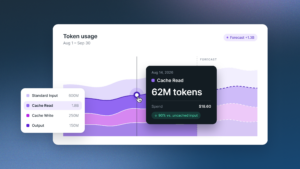
For Claude Sonnet 4.6, cache reads cost $0.30 per million input tokens instead of the standard $3.00. OpenAI’s pricing works the same way: on GPT-5.6 Terra, cached input tokens cost $0.25 per million instead of the standard $2.50, also a 90% discount. If your application sends tens of thousands of static tokens with every request and handles thousands of requests a day, those savings can add up surprisingly quickly.
To understand why prompt caching has such a big impact, it helps to know how AI providers charge for API requests.
Every time you call an AI API, you pay for input tokens and output tokens. Input tokens are everything you send in: your system prompt, any background context you’ve loaded, the conversation history, and the user’s actual message. Output tokens are what the LLM generates back.
For most applications, input tokens are the bigger cost driver. And the vast majority of those input tokens are identical from one request to the next. Your system prompt doesn’t change. Your tool definitions don’t change. Your RAG context for a given document doesn’t change. But without prompt caching, you’re paying full price to process all of it every single time.
How to Actually Use It
**Note:** If you’re using Claude Desktop or Claude Code, prompt caching is handled automatically, so you don’t need to configure anything. The implementation details in this section apply specifically to teams calling the Claude API directly in their own applications.
While the exact implementation differs between providers, the underlying workflow is the same: identify the static portion of your prompt, cache it once, and reuse it across future requests.
We’ll use Anthropic Claude as the example throughout this section because its implementation is well documented and illustrates the core concepts that apply across providers.
There are two ways to enable prompt caching using Claude, and they’re not mutually exclusive.
Option 1: Automatic caching. This is the easiest starting point. You add a single cache_control parameter at the top level of your request, and the API figures out the rest. It automatically applies a cache breakpoint to the last cacheable block and slides it forward as your conversation grows. For multi-turn chat applications, this is usually all you need.
python
response = client.messages.create( model=”claude-sonnet-4-6″, max_tokens=1024, cache_control={“type”: “ephemeral”}, system=”Your full system prompt here…”, messages=[…] )
That’s it. One field. You’re caching. OpenAI provides a similar request-level caching capability, while Google Gemini uses a more explicit Context Caching API with named cache objects. Amazon Bedrock and Azure OpenAI expose comparable functionality for supported models. Although the implementation differs, the optimization strategy is the same: cache the static portion of your prompt and reuse it whenever possible.
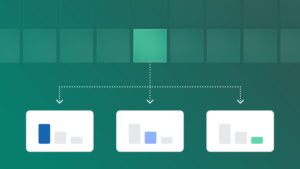
Option 2: Explicit breakpoints. If you want more control, you can place cache_control directly on individual content blocks. This is useful when different sections of your prompt change at different frequencies. Your tool definitions might be static for months. Your system instructions might update weekly. Your per-user context might refresh daily. You can cache each section independently and only pay to re-write the cache when that specific section actually changes.
The important rule to get right: put your cache breakpoint on the last block that stays identical across requests. If you put it on a block that includes a timestamp or the incoming user message, you’ll get a cache miss every time and pay for a cache write on top of it. Static content at the top, variable content at the bottom, breakpoint at the boundary.
The Pricing Reality
Let’s look at an example:
Say you have an application with a 50,000-token system prompt (not unusual if you’re building a document-heavy assistant or an agent with detailed instructions). You’re making 10,000 API calls a day. Let’s use Claude Sonnet 4.6 as an example, since Anthropic publishes straightforward cache pricing. The same principle applies across OpenAI, Gemini, and other providers that support prompt caching:
Without caching: 50,000 tokens x 10,000 calls x $3.00/million = $1,500/day just for that static context.
With caching: the first request writes the cache at 1.25x base rate (about $0.19 for the initial write), and every subsequent request reads it at $0.30/million. That’s 9,999 reads x 50,000 tokens x $0.30/million = $149.99/day.
You go from $1,500 to roughly $150. Same application. Same responses. One configuration change.
There’s a small caveat worth noting: cache writes cost 25% more than standard input tokens (for the default 5-minute TTL) or 2x base price for the 1-hour TTL. So if your cache is expiring frequently because there’s a long gap between requests, you want to think carefully about which TTL makes sense for your usage pattern. For most applications with regular traffic, the default 5-minute cache auto-refreshes for free each time it’s used, so the math almost always works in your favor.
When the Cache Breaks (and How to Avoid It)
The cache is keyed to an exact prefix hash. If anything in your prompt changes before the breakpoint, you get a cache miss. Common ways teams accidentally break their own cache:
Dynamic content in the wrong place. If you’re injecting a timestamp, request ID, or any other per-request variable before your cache breakpoint, you’re generating a unique hash on every call. Move that content after the breakpoint.
Inconsistent tool definitions. Some languages (Go, Swift) randomize JSON key ordering. If your tool definitions get serialized in a different order each request, the hash won’t match. Enforce stable ordering.
Toggling features on and off. Enabling or disabling web search, citations, or changing your speed setting modifies the system prompt, which invalidates the cache. Keep these settings consistent within a caching strategy.
TTL mismatches. Claude’s default cache lifetime is 5 minutes. Retention windows vary by provider so check this if you’re also caching against other APIs. If your application has long idle periods between requests, the cache expires and you pay a write fee when traffic resumes. For workflows where users might take 30 minutes between turns, the 1-hour TTL is worth the premium.
Anthropic also has a cache diagnostics feature in beta that compares consecutive requests and tells you exactly where the prefix diverged. If you’re troubleshooting unexplained cache misses, that’s the fastest path to the answer.
The Bigger Picture
Here’s the biggest takeaway..
FinOps for AI isn’t fundamentally different from FinOps for cloud, and neither are the cost optimization principles behind it. Whether your teams are building on Claude, ChatGPT, Gemini, or a mix of all three, the same instincts apply: understand your unit costs, identify what’s driving consumption, and optimize the patterns that repeat at scale. Prompt caching is one of the clearest examples of that. You’re not changing what your application does. You’re just stopping it from paying full price for work it already did.
The teams that get this right early will have a significant cost advantage as they scale. The teams that ignore it will eventually be forced to fix it when the bills get painful enough, and they’ll wonder why they waited.
This is exactly the kind of cost pattern that FinOps platforms like Kion are built to surface. Just as Kion gives you visibility into cloud spend by service, team, and workload, understanding your AI API costs at the unit level (model, prompt type, caching efficiency) is becoming an essential part of managing total technology spend. As AI becomes a meaningful line item in your infrastructure budget, the same governance practices that tamed cloud sprawl will apply here too.
If you’re building AI applications and haven’t enabled prompt caching where it’s available, it’s worth checking this week. Whether you’re using Claude, OpenAI, Gemini, Amazon Bedrock, or Azure OpenAI, prompt caching is one of the highest ROI infrastructure optimizations you can make.
Check your provider’s usage metrics to see how many requests are hitting the cache and how much you’ve saved on repeated input tokens.
It’s one of the higher ROI hours you’ll spend on your AI infrastructure this quarter.
Frequently Asked Questions
What is prompt caching and how does it save money on AI API costs?
Prompt caching is a feature offered by AI API providers that lets you store static portions of your prompt such as system instructions, tool definitions, or background context, so they don’t need to be reprocessed on every API call. Instead of paying full input token rates each time, you pay a much lower cache read rate on subsequent requests that reuse the same prefix. For example, Anthropic Claude reduces cache read pricing by roughly 90% compared to standard input tokens. OpenAI and other providers offer similar discounts, although exact pricing varies by model.
Which native AI and cloud providers support prompt caching?
Prompt caching is now available across the major AI ecosystem. Anthropic Claude supports automatic caching and explicit breakpoints. OpenAI offers automatic prompt caching for supported models. Google Gemini provides Context Caching using reusable cache objects. If you’re accessing these models through cloud platforms, Amazon Bedrock supports prompt caching for compatible foundation models, while Azure OpenAI Service provides prompt caching for supported GPT deployments with multiple retention options.
While the implementation details differ, the underlying benefit is the same across providers: reuse static prompt content instead of paying to process it on every request.
How much can prompt caching reduce my AI infrastructure costs?
The savings depend on how much of your prompt is static and how frequently you’re making API calls. As a concrete example: a 50,000-token system prompt sent across 10,000 daily API calls on Claude Sonnet 4.6 costs approximately $1,500/day without caching. With caching enabled, that drops to roughly $150/day using the same application, same responses, and only one configuration change. Applications with large system prompts, detailed tool definitions, or heavy RAG contexts see the highest returns.
What causes prompt cache misses and how do I avoid them?
A cache miss occurs when anything in your prompt changes before the cache breakpoint, generating a new prefix hash that doesn’t match the stored cache. Common causes include: injecting dynamic content (timestamps, request IDs, user-specific variables) before the breakpoint; inconsistent JSON key ordering in tool definitions (Go and Swift can randomize this); toggling features like web search or citations that modify the system prompt; and cache expiry from long idle periods between requests. The fix in each case is the same: keep all static content before the cache breakpoint, all variable content after it, and maintain consistent serialization.
How long does a cached prompt last, and what are the TTL options?
Cache lifetime depends on the AI provider you’re using. Most providers allow cached prompts to persist for a defined time-to-live (TTL), after which the cache expires and must be rebuilt. Some providers also offer multiple TTL options with different pricing models, allowing you to balance cache longevity against write costs.
For example, Anthropic Claude uses a default 5-minute TTL that automatically refreshes each time the cache is accessed, helping frequently used prompts stay warm indefinitely. It also offers a 1-hour TTL for applications with longer gaps between requests, though cache writes cost more at that tier. Other providers have different retention windows, cache behaviors, and pricing, so it’s worth checking the documentation for the models you’re using.
As a general rule, if your application makes frequent requests with the same static context, shorter TTLs often provide the best cost efficiency. If requests are more sporadic, a longer cache lifetime may reduce the number of cache rebuilds and lower your overall costs.
How does prompt caching fit into a FinOps strategy for AI?
Prompt caching is one of the clearest unit cost optimizations available for AI API spend. Just as cloud FinOps focuses on identifying repetitive consumption patterns and eliminating unnecessary spend, FinOps for AI applies the same logic to model inference: understand what’s driving token consumption, identify the portions of your prompt that repeat at scale, and stop paying full price to reprocess them. For organizations managing AI spend across multiple providers and teams, surfacing caching efficiency alongside other cost metrics, such as by model, workload, and team, is an important part of governing total AI infrastructure costs.