

Chargeback has two meanings. In payments, it is a card dispute. In FinOps, it means billing AI costs back to the teams that used them. This guide covers the second.
An AI chargeback model assigns the cost of AI usage, such as model tokens, GPU hours and shared platforms, to the teams that consume it. Build one by deciding which costs to charge, confirming your attribution data, choosing a rule for shared costs, setting internal rates, planning for unallocated spend, and moving from showback to chargeback in stages. The steps below walk through each one.
As AI adoption rapidly expands across organizations, understanding who is spending what becomes essential. Shared API keys, multiple model providers, and applications used across departments can make it difficult to connect AI costs to the teams and initiatives driving them. Without that connection, finance lacks clear budget ownership, and teams lack the visibility they need to manage their usage.
An AI chargeback model creates that accountability by assigning costs to the teams consuming AI resources. Getting it right starts with reliable attribution, clear allocation rules, and a process stakeholders understand. Together, these give teams the confidence to make informed decisions about AI investment and scale usage within their budgets.
This guide walks through how to build an AI chargeback model, from defining which costs to include to moving from showback to chargeback. If you’re still establishing visibility and ownership, start with our FinOps framework for managing AI token spend.
What is AI chargeback?
AI chargeback is the practice of billing internal teams, departments, or business units for the AI resources they consume. Those resources include model tokens, GPU hours, and shared platforms or tools. The cost moves from a central budget to the budget of the team that incurred it.
AI showback gives teams visibility into the costs they generate without transferring those costs to their budgets. It helps establish cost awareness and validate allocation data before an organization introduces chargeback
| Showback | Chargeback | |
| Teams see their AI costs | Yes | Yes |
| Costs move to team budgets | No | Yes |
| Typical use | Building cost awareness, early stage | Budget ownership and accountability, mature stage |
| Needs finance sign-off | Rarely | Yes |
For the broader definition of managing AI spend, see FinOps for AI.
Step 1: Decide what you will charge for
Start by defining which AI costs your chargeback model will cover. Sort spend into three groups.
- Direct usage. Token spend and API calls that trace to one team or application. These are the easiest to charge.
- Shared usage. One account, API key, or platform used by many teams. These need an allocation rule.
- Platform and overhead. GPU capacity commitments, tooling, and the people who run them. Decide whether to charge these at cost, add a markup, or absorb them centrally.
Document which costs teams will own and which will remain centrally funded. Clear boundaries give finance and business owners a consistent basis for reviewing charges and planning budgets.
Step 2: Make sure the data can support it
Reliable AI chargeback starts with understanding who consumed which resources. Before you set internal rates, check three things.
- Can you break spend down by model, provider, and team?
- Can you separate input tokens from output tokens, and cached from uncached usage?
- Is there a fallback owner for spend that cannot be traced?
If you cannot attribute spend to teams, establish that foundation before introducing chargeback. For AWS Bedrock specifically, see Automating Bedrock Cost Attribution.
Step 3: Pick how shared costs are split
Shared AI costs need a rule. The three common choices are an even split, fixed percentages, and a split proportional to each team’s usage or spend.
Choose an allocation method your organization can apply consistently and explain clearly. Each team should be able to understand how its share was calculated and how changes in usage affect its costs.
Worked example (illustrative numbers).
Consider an organization that spends $100,000 on AI in one month. $70,000 traces directly to three teams, $24,000 runs through one shared API key, and $6,000 cannot be traced to anyone. The shared pool is split in proportion to each team’s direct spend, and the untraced $6,000 is held in a central pool and reported as its own line.
| Line | Support | Marketing | Product | Central pool | Total |
| Direct usage | $30,000 | $15,000 | $25,000 | $0 | $70,000 |
| Share of direct spend | 42.9% | 21.4% | 35.7% | n/a | 100% |
| Shared pool ($24,000) | $10,286 | $5,143 | $8,571 | $0 | $24,000 |
| Unallocated | $0 | $0 | $0 | $6,000 | $6,000 |
| Full chargeback total | $40,286 | $20,143 | $33,571 | $6,000 | $100,000 |
In this example the unallocated share is 6% of total spend, which is the number to report every cycle and aim to reduce.
The mechanics of each method are covered in Allocating Shared AI Costs Across Teams.
Step 4: Set internal rates
Setting internal rates for AI chargeback comes down to two main options.
- Pass-through. Teams pay what the provider charged for their usage. This is simple and transparent.
- Internal rate card. Teams pay a published rate per unit, such as per million tokens or per GPU hour. Rates smooth out price changes and let you recover overhead.
If you use rate cards, review them on a fixed schedule and communicate changes in advance. Give teams enough time to understand the impact on their budgets and adjust their usage or forecasts.
Step 5: Handle unallocated spend
Unallocated AI spend is any cost you can’t trace to an owner, and every chargeback model needs a plan for it before the first invoice. Before introducing chargeback, document how your organization will fund these costs. Two options are:
- Hold it in a central pool and report it as its own line.
- Spread it across all teams in proportion to their allocated spend.
Whichever policy you choose, track the share of spend that lacks attribution each billing cycle and set a target to reduce it. Keep that share visible even if you distribute the costs across teams. An increase can signal gaps in tagging, ownership, or access practices that need attention.
Step 6: Move from showback to chargeback in stages
Move from AI showback to chargeback as your attribution data and operating processes mature. Start by giving teams visibility into their usage and an opportunity to validate the numbers. Introduce budget transfers once finance and team owners have confidence in the allocation method.
- Showback only. Share monthly reports and let teams question the numbers.
- Shadow chargeback. Show what each team would have been charged, with no budget impact.
- Partial chargeback. Charge direct usage first, and keep shared costs central.
- Full chargeback. Add shared costs and overhead once the data has held up for a few cycles.
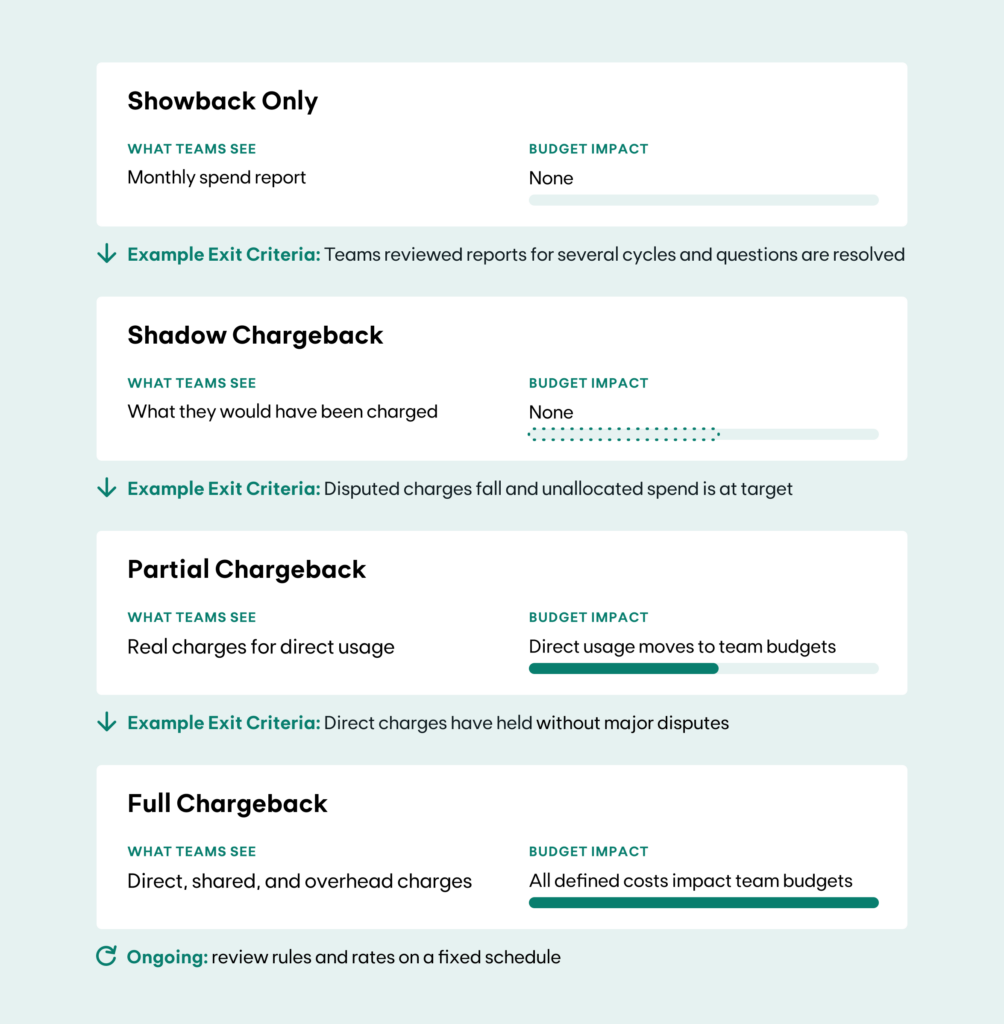
Exit criteria are examples. Give each stage a clear start date and set your own exit criteria with finance.
Start tracking coverage with your first showback report. Coverage is the share of AI spend that has a named owner. A common approach is to wait until most spend is attributed before charging real budgets. Pick a coverage target with finance, such as a percentage of total spend, and make it an exit criterion for shadow chargeback.
Step 7: Plan for disputes and reporting
Establish a clear process for reviewing questions and resolving disputed charges before the first billing cycle. Give finance and team owners a consistent way to validate costs and correct allocation issues. Include:
- A named owner for questions from each team
- A window, such as 10 business days, for disputing a charge
- A standard monthly report that shows spend by team, model, and cost type
- A short change log for any rule or rate update
How to charge back AI costs with Kion
Kion helps FinOps teams extend their cloud cost allocation practices to AI, connecting AI spend to the teams, departments, and initiatives responsible for it.
Scopes group costs into business views that reflect how your organization operates, while shared cost allocation methods distribute shared spend across teams. Billing Rules support custom pricing, markups, and discounts for internal cost reporting. Together, these capabilities give teams a consistent foundation for AI showback and chargeback alongside cloud spend. Kion also analyzes AI token costs by model, provider, input versus output, and cached versus uncached usage, which supports the data checks in Step 2.
Learn more about Cloud Cost Allocation, Showback & Chargeback.
A starting checklist
Use this checklist to assess readiness before transferring AI costs to team budgets.
- Categories of AI spend defined: direct, shared, overhead
- Attribution data in place by model, provider, and team
- Shared cost rule chosen and documented
- Pass-through or rate card decided
- Unallocated spend policy set
- Coverage target agreed with finance
- Rollout stages and dates agreed with finance
- Dispute process and monthly report ready
Frequently asked questions
Which AI costs should be charged back to teams?
Start with direct usage, meaning token spend and API calls that trace to one team or application. Add shared usage once you have an agreed split rule. Decide separately whether platform and overhead costs, such as GPU commitments and tooling, are charged at cost, marked up or kept central.
How do you charge back shared LLM API costs to business units?
Group the shared spend into a pool, choose a split rule (even, percentage, or proportional), and apply it each billing cycle. Document the rule so each business unit can reproduce its charge.
How should unallocated AI spend be handled in a chargeback model?
Decide in advance whether to hold unallocated AI spend in a central budget or distribute it proportionally across teams. Under either policy, report the share of spend that lacks attribution each billing cycle and set a target to reduce it.
Should we charge a markup on AI costs?
Only if you need to recover platform or support costs. Many teams start with pass-through rates and add a rate card later.
How long does it take to move from showback to chargeback?
It depends on data quality and finance readiness. Plan for several billing cycles of showback and shadow chargeback before charging real budgets.
What is shadow chargeback for AI?
Shadow chargeback is a trial run of chargeback. Each team sees the AI costs it would have been charged, but no money moves and no budgets change. It sits between showback and partial chargeback. Teams can check the numbers, question the allocation rules, and flag errors before real charges begin.
What coverage should we reach before charging AI costs back?
Coverage is the share of AI spend that has a named owner. Agree a target with finance, track it every billing cycle, and move to chargeback once the target has held for a few cycles. The target is an exit criterion for shadow chargeback in Step 6.